
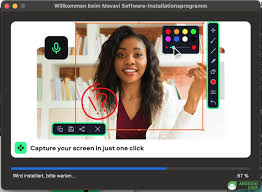
Discover the Essential Features of Movavi Screen Recorder
Have you ever found yourself wanting to capture a moment on your screen, whether it’s for creating tutorials, recording gameplay, or preserving important video calls? If so, you might have come across Movavi Screen Recorder.
Today, we’re going to dive into the essential features of this handy tool that make screen recording a breeze. So grab your favorite snack, and let’s explore what makes Movavi Screen Recorder a must-have in your software toolkit!
What is Movavi Screen Recorder?
Before we jump into the features, let’s quickly clarify wha Movavi Screen Recorder actually is. It’s a user-friendly application designed to help you record anything happening on your screen.
Whether you’re on Windows or macOS, this software allows you to capture high-quality videos with ease. Its intuitive interface and powerful functionality make it suitable for both beginners and seasoned pros alike.
Easy-to-Use Interface

One of the standout features of Movavi Screen Recorder is its easy-to-navigate interface. You don’t need to be a tech wizard to start recording! When you launch the app, you’ll be greeted with straightforward options that guide you through the process.
The layout is clean and intuitive, allowing you to start capturing your screen with just a few clicks. This is especially great for those who might feel overwhelmed by more complex software.
Flexible Recording Options
Movavi Screen Recorder shines when it comes to flexibility. You can choose to record the entire screen or select a specific area—perfect for focusing on just one part of your display! Additionally, if you’re planning to record a webinar or online lecture, there’s an option to capture system audio along with your microphone input. This means you can narrate while capturing the sound from whatever you’re watching.
High-Quality Output
Nobody wants grainy videos or choppy recordings, right? Thankfully ,Movavi ensures that you can capture content in high quality (up to 4K resolution!). Whether it’s vibrant game graphics or detailed presentations, you’ll get crisp visuals that maintain their quality even after editing.
Additionally, with adjustable frame rates and bitrates available, you can tailor your recordings to meet your specific needs.
Built-in Editing Tools
After recording comes the fun part: editing! Movavi Screen Recorder isn’t just about capturing footage; it also includes basic editing tools that let you trim unnecessary parts from your video or add text overlays and arrows for emphasis. You can easily stitch together multiple clips into one cohesive video without needing additional software.
Scheduled Recording

Have you ever missed out on an important live stream because of timing conflicts? With Movavi’s scheduled recording feature, you’ll never have that problem again! You can set up recordings in advance, and the software will automatically start capturing at your chosen time—perfect for those late-night gaming sessions or catching that webinar while you’re busy.
Exporting Made Simple
Once you’ve completed your masterpiece, exporting it should be hassle-free—and Movavi delivers just that. The software supports a wide range of formats like MP4, AVI, MOV, and more. You can also optimize videos for various devices such as smartphones or tablets with just a few clicks. It’s all about convenience!
Conclusion
In summary, Movavi Screen Recorder is an impressive tool packed with features designed for anyone who wants to capture their screen effortlessly. From its user-friendly interface and flexible recording options to high-quality output and built-in editing capabilities—this software checks all the boxes! Whether you’re creating tutorials for friends or documenting important meetings at work, Movavi makes it easy.
“Unlock Seamless Screen Recording: Try Movavi Screen Recorder Free for 7 Days!”
So why not give it a try? Head over to their website and download a trial version today! Who knows? You might find yourself recording everything from gaming sessions to family gatherings in no time. Happy recording!
If you’ve enjoyed learning about these features or have any experiences using Movavi Screen Recorder yourself, drop a comment below! We’d love to hear from you!
Best Wishes,
Gadgets & Gizzmo’s

 gadget and gizzmo"s